
Today we've released Torrent Ratio Keeper Beta for Linux/*BSD/MacOS. This version runs on any PC with Java 1.5/1.6/1.7 installed.
After the first time launching the program, you will see this screen:
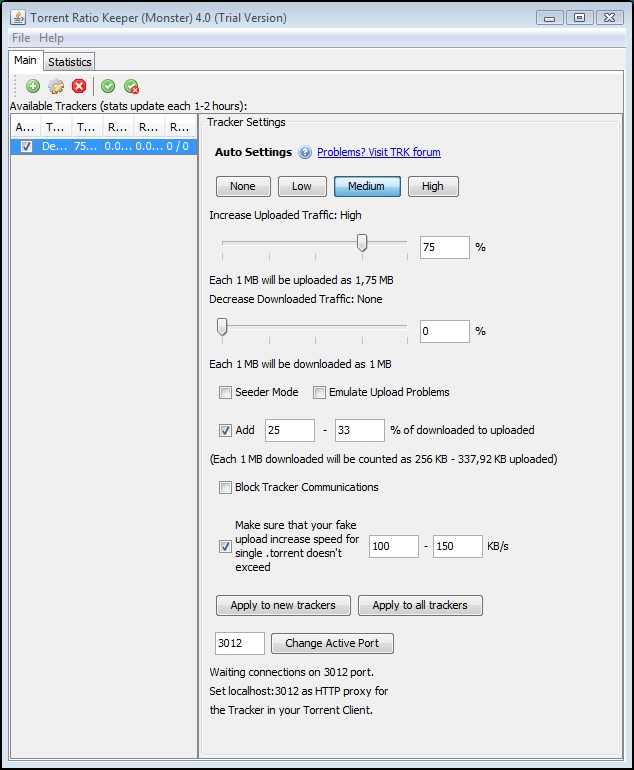
Look at the right bottom corner. You will see active port. You can change it or leave it as is.
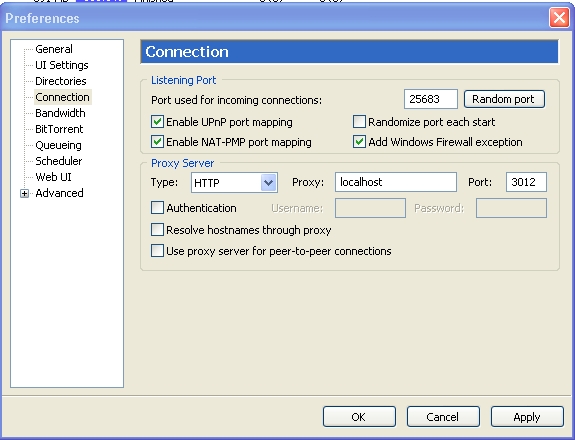
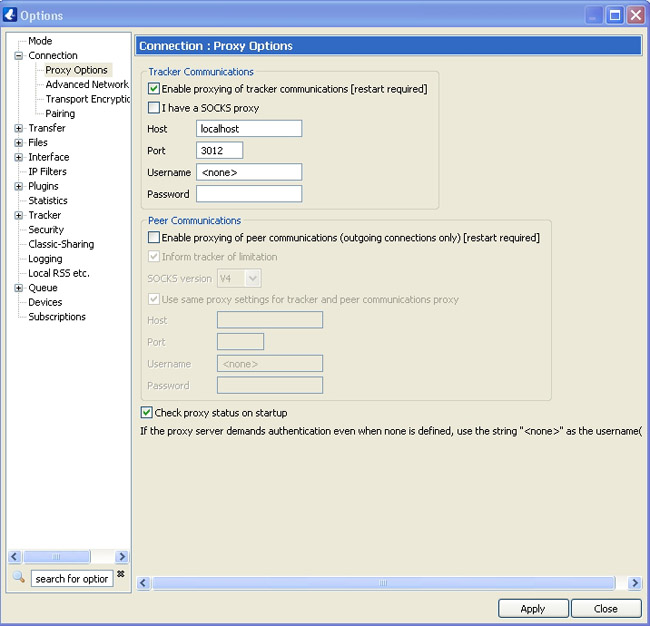
Now you should launch your torrent client and enter "localhost:3012" as HTTP proxy.
Example for uTorrent (Click Options\Preferences\Connection):
Example for Vuze (Click Tools\Options\Connection):
Example for Deluge (Click Options\Preferences\Connection):
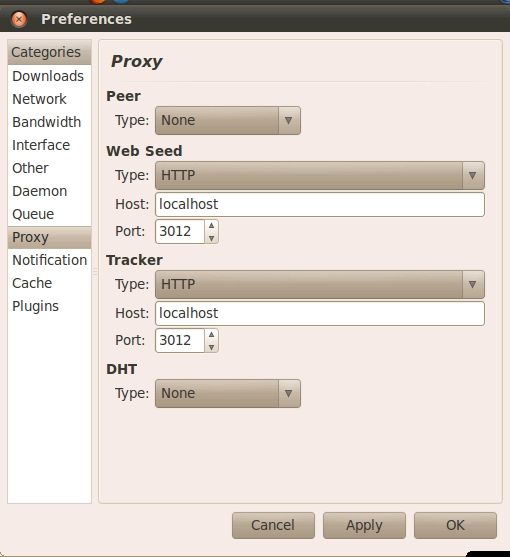
Example for Transmission (Click Edit\Preferences\Proxy):
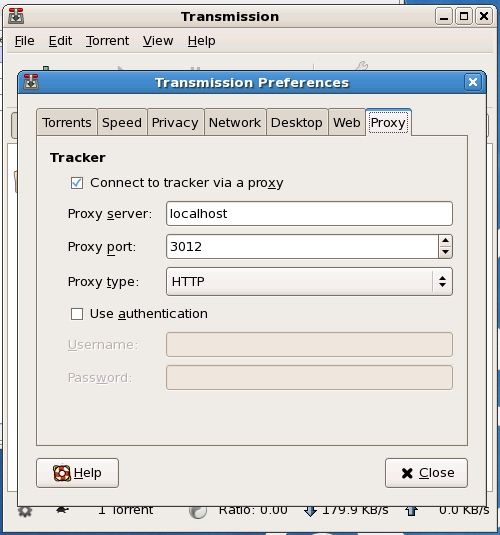
If you run Transmission as daemon or console application, settings.json should have settings like:
"proxy": "localhost",
"proxy-auth-enabled": false,
"proxy-auth-password": "",
"proxy-auth-username": "",
"proxy-enabled": true,
"proxy-port": 3012,
"proxy-type": 0,
You can start your downloading or seeding. Wait a minute, and the program will automatically add the trackers to the list. You can change upload boost for each of them to increase your torrent ratio.
You'll see the values in the table update, within 1-2 hours. This depends on the tracker update time (you can find it in your torrent client).
The first value is the real uploaded traffic, and the second next is what the program sent to the tracker.
You can also run TRK from command line on your server, router or seedbox:
Code: Select all
Usage: java -jar TorrentRatioKeeperMonster.jar -ui:0 [OPTIONS]


-ui:1|0 (launch TRK with gui or without. Default - 1)

-active:1|0 (Activate TRK for the new tracker (Default Settings). Default value is 1)

-upinc:0..1000 (Increase Uploaded Traffic for the new tracker (Default Settings). Default value is 75(%))

-downdec:0..100 (Decrease Downloaded Traffic for the new tracker (Default Settings). Default value is 0, turned off)

-seeder:1|0 (Turn on Seeder mode for the new tracker (Default Settings). Default value is 0)

-noup:1|0 (Emulate Upload Problems for the new tracker (Default Settings). Default value is 0)

-blocktracker:1|0 (Block Tracker Communications for the new tracker (Default Settings). Default value is 0)

--- Add x-y% of downloaded to uploaded  ---

-adddowntoup:1|0 (Add x-y% of downloaded to uploaded for the new tracker (Default Settings). Default value is 0)

-adddowntoupx:0..100000 (X of adddowntoup for the new tracker (Default Settings). Default value is 25)

-adddowntoupy:0..100000 (Y of adddowntoup for the new tracker (Default Settings). Default value is 33)

--- Limit torrent fake upload speed  ---

-limtorrent:1|0 (Make sure that your fake upload increase speed for single .torrent doesn't exceed X-Y kb/s for the new tracker (Default Settings). Default value is 0, turned off)

-limtorrentx:0..100000 (X kb/s of limtorrent for the new tracker (Default Settings). Default value is 100)

-limtorrenty:0..100000 (Y kb/s of limtorrent for the new tracker (Default Settings). Default value is 150

--- Settings  ---

-port:1..65535 (TRK listens this port. You need to setup your torrent client to use the port as HTTP proxy. Default port is 3012. Example: localhost:3012)

-lc:<TRK_license_key> (The license key activates TRK on your PC. It's enough to launch TRK with this parameter one time.)

--help (display this help and exit)


Example: java -jar TorrentRatioKeeperMonster.jar -ui:0 -seeder:1 -noup:0 -upinc:112 -downdec:0